

Introduction
A reliable NEMT software comparison scores each vendor against your own trips, brokers and budget rather than against a feature list. It takes five steps: define your requirements, script the demo, check references, model the total cost and read the contract. This guide covers each step and ends with a scoring sheet you can apply to every vendor on your shortlist, whatever dispatching software you use today.
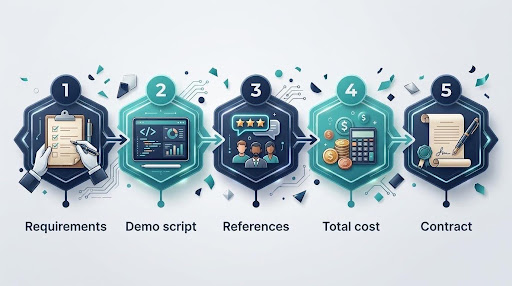
Why a Feature List Makes a Weak NEMT Software Comparison?
Almost every NEMT platform lists dispatch, routing, a driver app, GPS tracking and billing. A feature list tells you what exists. It does not tell you how the system behaves on a busy morning when two drivers call off and a broker drops same-day trips into the portal.
A feature list also hides cost. The same fleet can pay very different amounts depending on whether a vendor charges per vehicle, per trip or by custom quote, as the breakdown of NEMT software cost shows. A structured NEMT software comparison puts every vendor through the same tests, so the differences show up before you sign rather than after. It also gives you a written record of why you chose one platform over another.
Step 1: Define Your Requirements Before the First Demo
Requirements come first because they decide which vendors deserve a demo at all. Write them down in three groups and send the list to every vendor before the call.
Your Operating Profile
Record the numbers a vendor needs to size the system:
- Vehicles by type, ambulatory and wheelchair
- One-way trips per day, average and peak
- Share of standing orders against will-call returns
- Service hours and number of dispatchers
- States and counties you operate in
If you do not track these yet, a week of manual counting is enough to start. The same figures feed your fleet utilisation benchmarks later.
Your Broker and Payer Mix
List every broker, health plan and private-pay source that sends you trips, with the approximate share of volume from each. Broker integration is where platforms can differ sharply, and broker models keep evolving. Ask which connections are direct integrations and which rely on file uploads.
Integrations Beyond Brokers
List the other systems the platform must talk to, such as accounting, payroll, a clearinghouse or a billing service. Driver credentials matter too, since expiring licences and certifications need tracking, which is why document management and payroll belong in the requirements, not as afterthoughts.
Must-Haves and Nice-to-Haves
Split every requirement into must-have and nice-to-have. A must-have is anything that would stop you running trips or getting paid. A vendor that fails a must-have leaves the NEMT software comparison, however well it scores elsewhere.
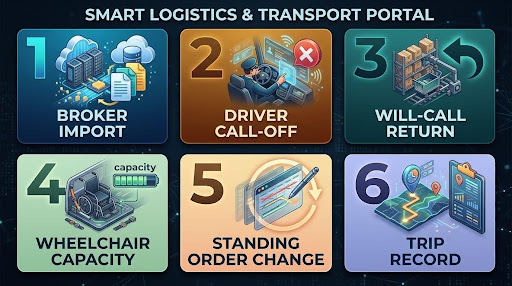
Step 2: Script the Demo Scenarios
A scripted demo makes each vendor solve the same problems in front of you, using your data rather than a sample account. Send the scenarios in advance, so nobody can claim they were caught unprepared.
- Import tomorrow’s trips from your own broker file and show any rows that fail
- A driver calls off at 6:30 a.m. with eight trips on the manifest
- A will-call return comes in mid-afternoon and needs a vehicle
- A wheelchair trip lands on a vehicle with one securement position left
- One leg of a three-times-weekly standing order changes address
- Pull the complete record for a trip completed last week
What to Watch During the Demo?
The scenarios test outcomes. These details show how the platform will feel on a full day:
- How fast screens load with a full day of trips
- How many clicks a reassignment takes
- How exceptions surface to the dispatcher
- How the driver app behaves on a real phone
- What happens when a driver loses signal
Watch who does the work. If the sales engineer clicks through a workaround you would never find alone, note it. The last scenario matters more than it looks, because trip records sit at the centre of any Medicaid compliance audit.
Score each scenario on the day, while the details are fresh. Two or three vendors scored in the same week give a far cleaner NEMT software comparison than demos spread across a quarter.

Step 3: Check References the Right Way
NEMT software reviews on G2 or Capterra make a useful first filter, but they may not describe an operation like yours. A reference call with a comparable customer tells you far more.
Ask each vendor for two references that match your fleet size and broker mix, plus one customer who joined in the last six months. Recent customers remember onboarding clearly.
Questions to Ask a Reference
- How long did onboarding take in practice?
- Which broker connections broke, and how fast were they fixed?
- What do your drivers think of the app?
- What surprised you on the first invoice?
- Would you sign the same contract again?
Reading NEMT Software Reviews and Best-Of Lists
Check the date spread and the reviewer’s role on any review site. A cluster of reviews from one month, or reviews that only praise the sales team, tell you little about daily use. Many best NEMT software lists are also published by vendors themselves, so check who wrote a list before you trust its ranking.
Give the driver answers extra weight. An app drivers dislike gets worked around, and driver experience now shows up in retention and on-time performance.
Step 4: Model the Total Cost
The monthly subscription is only one line in the total. Model every vendor over 12 months, at your current size and at the size you expect to reach.
Compare Pricing Models on Your Own Volume
Vendors charge per vehicle, per trip or by custom quote. Per-vehicle pricing suits fleets with high trip density, while per-trip pricing can suit fleets with seasonal or uneven volume. Run both against your real trip count, because the cheaper model at 5 vehicles is not always the cheaper model at 20.
For a sense of scale, a 10-vehicle fleet running 1,600 trips a month pays roughly $350 to $1,050 a month at published rates, as the NEMT software cost breakdown sets out. Your own NEMT software comparison should use your own trip count, not that example.
Read how trips are counted, too. At least one published price list counts a round trip as two billable trips and bills no-shows and trips cancelled at the door.
Add the Costs Outside the Subscription
Ask each vendor to list every charge beyond the headline rate in writing. The usual candidates are:
- Onboarding, training and data migration
- Extra broker integrations or connection fees
- SMS and passenger notification credits
- Phones or tablets for drivers
- Clearinghouse or billing service fees
Put Dispatcher Time in the Model
Software cost only makes sense next to the labour it frees up. The median US dispatcher wage is $24.20 an hour, or $50,340 a year before payroll costs, according to BLS wage data. If automation lets one dispatcher cover roughly twice as many vehicles, that saving can outweigh the price gap between vendors.
Step 5: Read the Contract Before You Sign
Contract terms decide how easy it is to leave, and how safe your data is while you stay. Check five areas before you sign.
Data Ownership and Export
The contract should state that trip, rider and billing data belong to you, and that you can export it in a standard format at any time, including at exit. Ask for a sample export during the trial. Losing your history hurts most at the worst moment, for example when you lose a primary broker and need to win another.
Business Associate Agreement
Any vendor that stores protected health information for a HIPAA-covered organisation needs a signed business associate agreement. HHS confirms that this applies to cloud service providers holding that data, so a vendor that will not sign one should not hold your trips. Compare its answer on security with its published data security practices.
Term, Renewal and Price Changes
Check the minimum term, the notice period, any automatic renewal and how far prices can rise at renewal. A month-to-month plan with a free trial carries the least risk while you are still testing.
Implementation and Onboarding
Ask who migrates your data, how long go-live takes, what training is included and whether you can run the old and new systems side by side for a week. Get the onboarding plan in writing, with named contacts on both sides.
Support and Uptime
Dispatch starts before sunrise and runs through weekends. Get support hours in writing, along with target response times and what the vendor commits to if the platform goes down during service hours.
How Long Should a NEMT Software Comparison Take?
A NEMT software comparison should take about four weeks from requirements to signature for a small or mid-sized fleet. Longer than that and the first demos fade from memory, shorter and references get skipped.
- Week 1: requirements written and sent to a shortlist of three
- Week 2: scripted demos, scored on the day
- Week 3: reference calls and 12-month cost models
- Week 4: contract review and a trial with the front-runner
Keep one person responsible for the NEMT software comparison from start to finish, ideally the operations lead who will own the platform after go-live. Consistency in who scores matters as much as the scores themselves, and a single owner stops the process drifting between demos.
Common Mistakes in a NEMT Software Comparison
Weak decisions often come from skipping a step rather than choosing the wrong vendor. Avoid these five:
- Choosing on the monthly price alone
- Letting each vendor run its own demo script
- Leaving drivers out of the trial
- Signing an annual term before a trial
- Ignoring data export until you want to leave
Each one is cheap to avoid during a NEMT software comparison and expensive to fix after go-live.
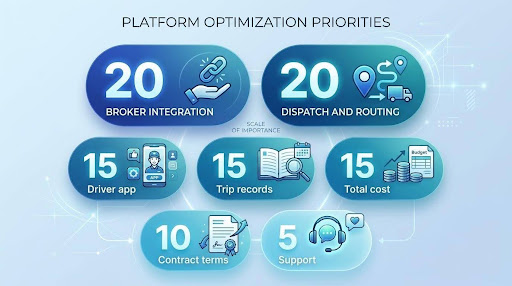
The NEMT Software Comparison Scoring Sheet
Alt text: Weighted scoring criteria for a NEMT software comparison
The scoring sheet turns the five steps into one number per vendor. Weight each criterion by how much it matters to your operation, score every vendor from 1 to 5, then multiply.
Criterion | Weight | What a score of 5 looks like |
Broker integration | 20% | Direct connections to your brokers, shown live in the demo |
Dispatch and routing | 20% | All six scenarios solved without workarounds |
Driver app | 15% | References report drivers use it without prompting |
Trip records and billing | 15% | Complete trip record produced on request |
Total 12-month cost | 15% | Lowest modelled cost at current and projected size |
Contract and data terms | 10% | Month-to-month, full data export, agreement signed |
Support and onboarding | 5% | Written support hours and a named onboarding lead |
To score, multiply each rating by its weight and add the results. A vendor rating 4 on broker integration earns 0.8 for that line, since 4 times 20% is 0.8. A perfect vendor totals 5.0. Only compare totals between vendors scored on the same weights by the same people.
Adjust the weights to your own priorities, but fix them before scoring starts. Any vendor scoring 1 on a must-have is out, whatever its total. The highest total is your front-runner, not your final answer.
There is no single best NEMT software for every fleet. There is the platform that scores highest against your own trips, brokers and budget, and this sheet is how you find it.
Measure Your Real Fleet Utilization
Calculator Download Form
Run the Comparison on Your Own Trips
A demo shows what a vendor wants you to see. A trial shows what your dispatchers and drivers will live with every day. Run your scripted scenarios on live trips during the trial, then score the vendor again at the end.
Keep the completed scoring sheet on file. It becomes the benchmark for your next NEMT software comparison, whether that comes at contract renewal or when the fleet doubles in size.
Darter is integrated with the major brokers in New York and New Jersey, and runs route optimisation and driver management in the same platform, so you can test the whole workflow rather than a single screen.
Put Darter through your own NEMT software comparison with a free trial. No setup fee, cancel at any time.